PDF: All Papers (except Editorials)
Attention
PDF checks are the same as HTML checks with some exceptions. This page explains the cases where PDF requirements differ from HTML checks. Please use a merge of HTML and PDF checks for PDF review. Aside from noted differences below, all elements of the HTML should match the PDF.
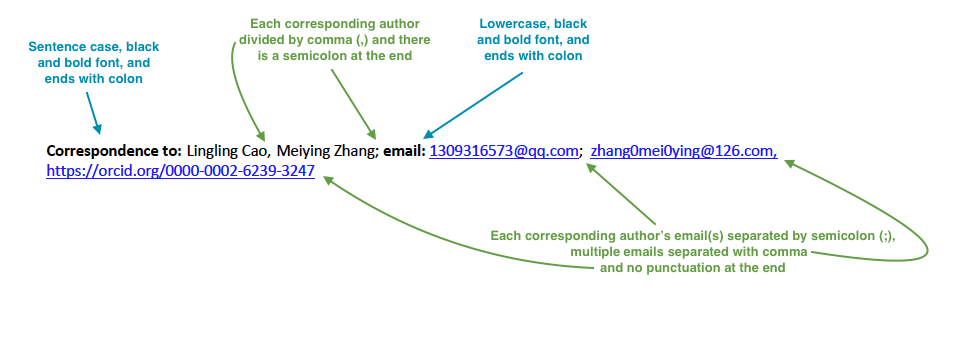
5. Correspondence
5.1. Check that correspondence section has a title “Correspondence to:” (sentence case and followed by colon (:)).
5.2. Check that “Correspondence to:” is in black and bold font.
5.3. Check that “Correspondence to:” is followed by full author name. If there are a few corresponding authors, then all corresponding author full names should be listed after “Correspondence to:” and divided by comma (,).
5.4. Check that corresponding author (or list of authors) ends with a semicolon (;).
5.5. Check that the word “email:” follows the corresponding author (author list).
5.6. Check that the word “email:” is lowercase, is in black and bold font and ends with a colon (:).
5.7. Check that corresponding author email address (or email addresses if there are a few of corresponding authors) are listed after “email:”. Each corresponding author’s email (or group of emails) should be separated by a semicolon (;). If an author has multiple emails, then they should each be separated by a comma (,).
5.8. Check that there is no punctuation mark at the end of the last email.
6. Keywords
6.1. Check that Keywords section has a title “Keywords:” (title case and followed by colon (:)).
6.2. Check that “Keywords:” is in black and bold font.
6.3. If there are multiple keywords, check that they are divided by a comma (,).
6.4. Check that there is no punctuation mark at the end of the last keyword.

7. Dates
7.1. Check that “Received:”, “Accepted:”, “Published:” is in black and bold font.
7.2. Check that dates are separated by white space.


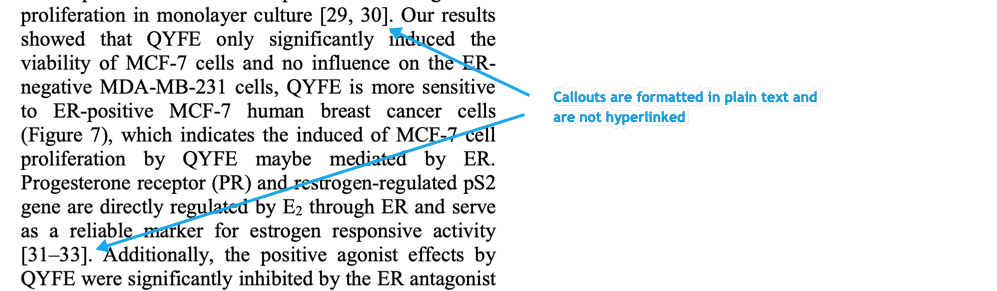
9. Reference Callouts
9.1. Check that callouts are formatted in plain text and are not hyperlinked.
10. References
Attention
Font of the references differs from rest of the article. This is OK.
10.3. Citation-Data (in-house)
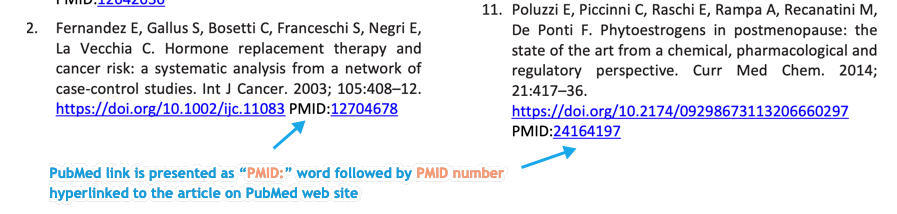
10.3.1. Check that [PubMed] link is presented in PDF as “PMID:” word followed by hyperlinked PMID number.
10.3.2. Check that “PMID:” word is written in ALL CAPS and formatted as plain text (no special formatting) and has a colon (:) at the end.
10.3.3. Check that PMID number is hyperlinked to the PMID website.
10.4. Citation-Data (other journals)
10.4.1. Check that [PubMed] link is presented in PDF as “PMID:” word followed by hyperlinked PMID number.
10.4.2. Check that “PMID:” word is written in ALL CAPS and formatted as plain text (no special formatting) and has a colon (:) at the end.
10.4.3. Check that PMID number is hyperlinked to the PMID website.